---
title: Approval function
description: test
---
[Skip to content](https://help.cloudsign.jp/en/articles/2827642#main-content)
- [English](https://help.cloudsign.jp/en/articles/2827642)
- [日本語](https://help.cloudsign.jp/ja/articles/2827642)
English
Show submenu for translations
[](https://help.cloudsign.jp/en/?hsLang=en)
Open main navigation
Close main navigation
- - [English](https://help.cloudsign.jp/en/articles/2827642)
- [日本語](https://help.cloudsign.jp/ja/articles/2827642)
English
Show submenu for translations
How can we help you?
- There are no suggestions because the search field is empty.
1. [CloudSign Help Center](https://help.cloudsign.jp/en?hsLang=en)
2. [Setting ・Administrator privilege](https://help.cloudsign.jp/en/setting-administrator-privilege?hsLang=en)
3. [Advanced settings](https://help.cloudsign.jp/en/setting-administrator-privilege?hsLang=en#advanced-settings)
# Approval function
`Business Plan`
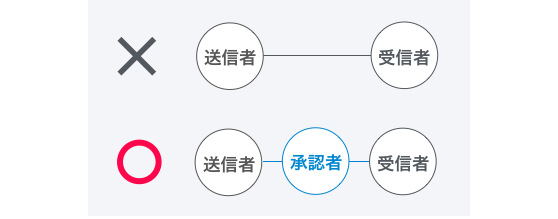
The approval function is a function that restricts documents from being sent without including a company approver in the document transmission process.
Using this function prevents employees with accounts from being able to conclude contracts of their free will. This helps avoid situations where sales staff may enter into contracts by themselves without going through a contract manager, which is the usual process that is normally required at companies.
[](https://help.cloudsign.jp/hubfs/ApprovalFunc1.png?hsLang=en)
| 送信者 | Sender |
| --- | --- |
| 承認者 | Approver |
| 受信者 | Recipient |
---
### Settings
**\[Video of Steps\]**
The approval function **can only be configured by an administrator with team administrator rights.** Follow the two steps below.
```
1. In the Management/Member Screen, specify the approver (multiple members can be specified)2. In the Settings/Team Screen, enable approval rights
```
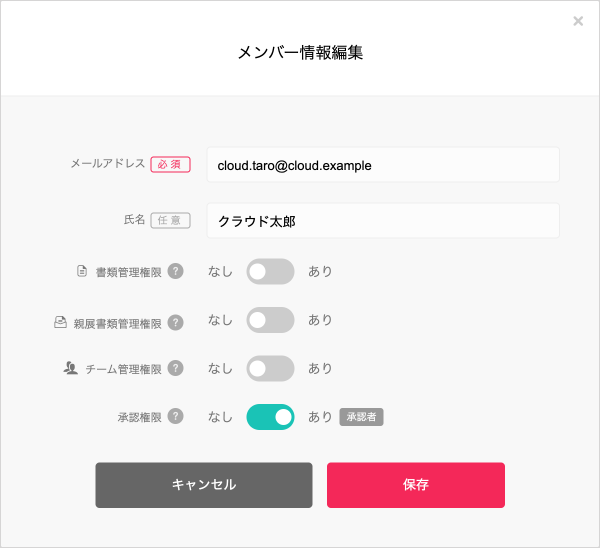
1.In the [Member](https://www.cloudsign.jp/accounts/1) screen, change the approval rights of the desired member to “Yes.” Multiple approvers can be specified.You cannot grant approval rights to yourself, so please request a different “team administrator” to do so.
[](https://help.cloudsign.jp/hubfs/ApprovalFunc2.png?hsLang=en)
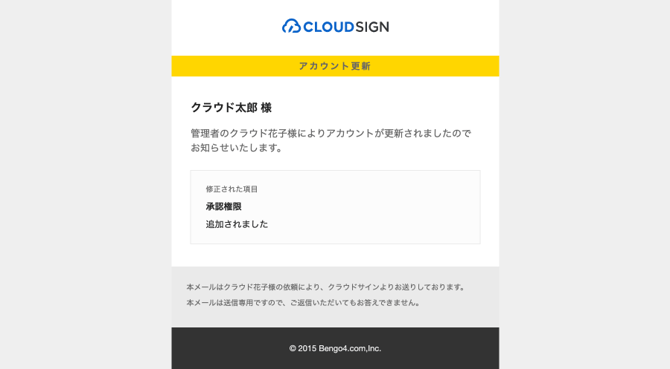
Members specified as approvers will receive a notification email stating that they have been granted approval rights.
[](https://help.cloudsign.jp/hubfs/ApprovalFunc3.png?hsLang=en)
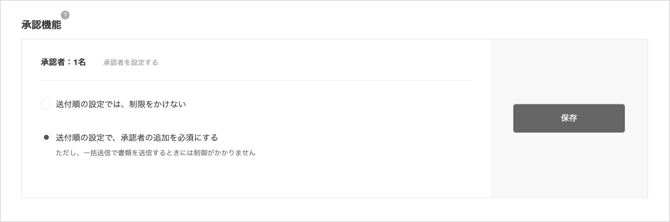
2\. The approval function can be configured from the [Team](https://www.cloudsign.jp/team/advanced)Screen.
[](https://help.cloudsign.jp/hubfs/ApprovalFunc4.png?hsLang=en)
Select “`Approver must be added when specifying the routing order`” and save to enable the approval function.
This screen allows you to check how many members are specified as approvers, or to switch ON or OFF the approval function.
---
### Usage
**\[Video of Steps\]**
If the approval function is turned ON, the “An approver must always be included in the routing order” message is displayed when a team member specifies the routing order, and the member cannot proceed to the next step without specifying an approver.
[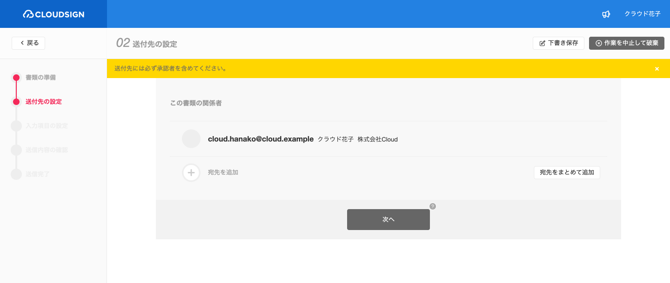](https://help.cloudsign.jp/hubfs/ApprovalFunc5.png?hsLang=en)
The contact details of team members are added to Contacts, so an approver can be verified and added. Note that selecting the “Show approvers only” checkbox at the top right filters members who are approvers.
[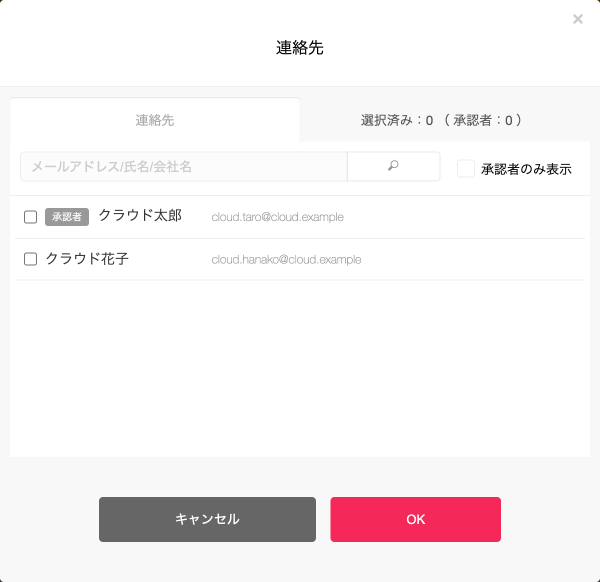](https://help.cloudsign.jp/hubfs/ApprovalFunc6.png?hsLang=en)
The “Next” button becomes available if at least one approver is specified. (Not affected by the specified recipient order)
After specifying an approver, the process is the same as when normally sending a document.
Please skip to the [Sending documents](https://help.cloudsign.jp/en/articles/384878?hsLang=en) section (5) Specify input fields.
---
### Precautions
- The use of the approval function to restrict transmissions is currently not available for documents sent via bulk transmissions (β version) / Web−API.
- Members who are approvers themselves can send documents without including a different approver in the routing order.
- The document can be sent if at least one approver is added to the recipients. The order of the approver does not matter.
- You cannot grant approval rights to yourself, so please request a different “team administrator” to do so
- [FAQ](https://help.cloudsign.jp/en/faq?hsLang=en#main-content)
- [About CloudSign](https://help.cloudsign.jp/en/faq?hsLang=en#about-cloudsign)
- [About documents](https://help.cloudsign.jp/en/faq?hsLang=en#about-documents)
- [About operation](https://help.cloudsign.jp/en/faq?hsLang=en#about-operation)
- [notification emails](https://help.cloudsign.jp/en/faq?hsLang=en#notification-emails)
- [Plans](https://help.cloudsign.jp/en/plans?hsLang=en#main-content)
- [Free plan](https://help.cloudsign.jp/en/plans?hsLang=en#free-plan)
- [Paid Plan](https://help.cloudsign.jp/en/plans?hsLang=en#paid-plan)
- [Free option](https://help.cloudsign.jp/en/plans?hsLang=en#free-option)
- [Paid option](https://help.cloudsign.jp/en/plans?hsLang=en#paid-option)
- [Collaboration plan](https://help.cloudsign.jp/en/plans?hsLang=en#collaboration-plan)
- [Email address setting and login setting](https://help.cloudsign.jp/en/email-address-setting-and-login-setting?hsLang=en#main-content)
- [login](https://help.cloudsign.jp/en/email-address-setting-and-login-setting?hsLang=en#login)
- [Sending documents](https://help.cloudsign.jp/en/sending-documents?hsLang=en#main-content)
- [Upload and edit documents](https://help.cloudsign.jp/en/sending-documents?hsLang=en#upload-and-edit-documents)
- [Destination settings](https://help.cloudsign.jp/en/sending-documents?hsLang=en#destination-settings)
- [Bulk sending](https://help.cloudsign.jp/en/sending-documents?hsLang=en#bulk-sending)
- [Settings when sending](https://help.cloudsign.jp/en/sending-documents?hsLang=en#settings-when-sending)
- [Operations after sending](https://help.cloudsign.jp/en/sending-documents?hsLang=en#operations-after-sending)
- [Template](https://help.cloudsign.jp/en/sending-documents?hsLang=en#template)
- [Receiving documents](https://help.cloudsign.jp/en/receiving-documents?hsLang=en#main-content)
- [Recipient guide](https://help.cloudsign.jp/en/receiving-documents?hsLang=en#recipient-guide)
- [Receiving docs](https://help.cloudsign.jp/en/receiving-documents?hsLang=en#receiving-docs)
- [Managing documents](https://help.cloudsign.jp/en/managing-documents?hsLang=en#main-content)
- [Document confirmation](https://help.cloudsign.jp/en/managing-documents?hsLang=en#document-confirmation)
- [Enter document information](https://help.cloudsign.jp/en/managing-documents?hsLang=en#enter-document-information)
- [Document import](https://help.cloudsign.jp/en/managing-documents?hsLang=en#document-import)
- [Setting ・Administrator privilege](https://help.cloudsign.jp/en/setting-administrator-privilege?hsLang=en#main-content)
- [Personal settings](https://help.cloudsign.jp/en/setting-administrator-privilege?hsLang=en#personal-settings)
- [Administrator settings](https://help.cloudsign.jp/en/setting-administrator-privilege?hsLang=en#administrator-settings)
- [Advanced settings](https://help.cloudsign.jp/en/setting-administrator-privilege?hsLang=en#advanced-settings)
- [Electronic signature](https://help.cloudsign.jp/en/electronic-signature?hsLang=en)
- [API・External service linkage](https://help.cloudsign.jp/en/api-external-service-linkage?hsLang=en#main-content)
- [Web API](https://help.cloudsign.jp/en/api-external-service-linkage?hsLang=en#web-api)
- [External collaboration](https://help.cloudsign.jp/en/api-external-service-linkage?hsLang=en#external-collaboration)
- [CloudSign Payments](https://help.cloudsign.jp/en/api-external-service-linkage?hsLang=en#cloudsign-payments)
- [Law](https://help.cloudsign.jp/en/api-external-service-linkage?hsLang=en#law)
- [Security](https://help.cloudsign.jp/en/security?hsLang=en)
- [Troubleshooting](https://help.cloudsign.jp/en/troubleshooting?hsLang=en#main-content)
- [Login](https://help.cloudsign.jp/en/troubleshooting?hsLang=en#login)
- [Email sending and receiving](https://help.cloudsign.jp/en/troubleshooting?hsLang=en#email-sending-and-receiving)
- [Input items / consent related](https://help.cloudsign.jp/en/troubleshooting?hsLang=en#input-items-consent-related)
- [PDF / signature related](https://help.cloudsign.jp/en/troubleshooting?hsLang=en#pdf-signature-related)
- [Address settings and document information](https://help.cloudsign.jp/en/troubleshooting?hsLang=en#address-settings-and-document-information)
- [Others](https://help.cloudsign.jp/en/troubleshooting?hsLang=en#others)
[](https://www.cloudsign.jp/)
© 2015 Bengo4.com, Inc.